
Overview
By adding the tags auto-propagation feature in Snowflake, it effectively shifted the data governance to the left at the source level and removed the burden and responsibility of identifying downstream columns which are potentially breaking the data governance strategy and exposing sensitive data due to an human error.
In Snowflake, best practices for data governance is to use masking policies associated with tags. For sensitive data, masking at column level is the most common and best practice, so tags are applied at column level in Snowflake.
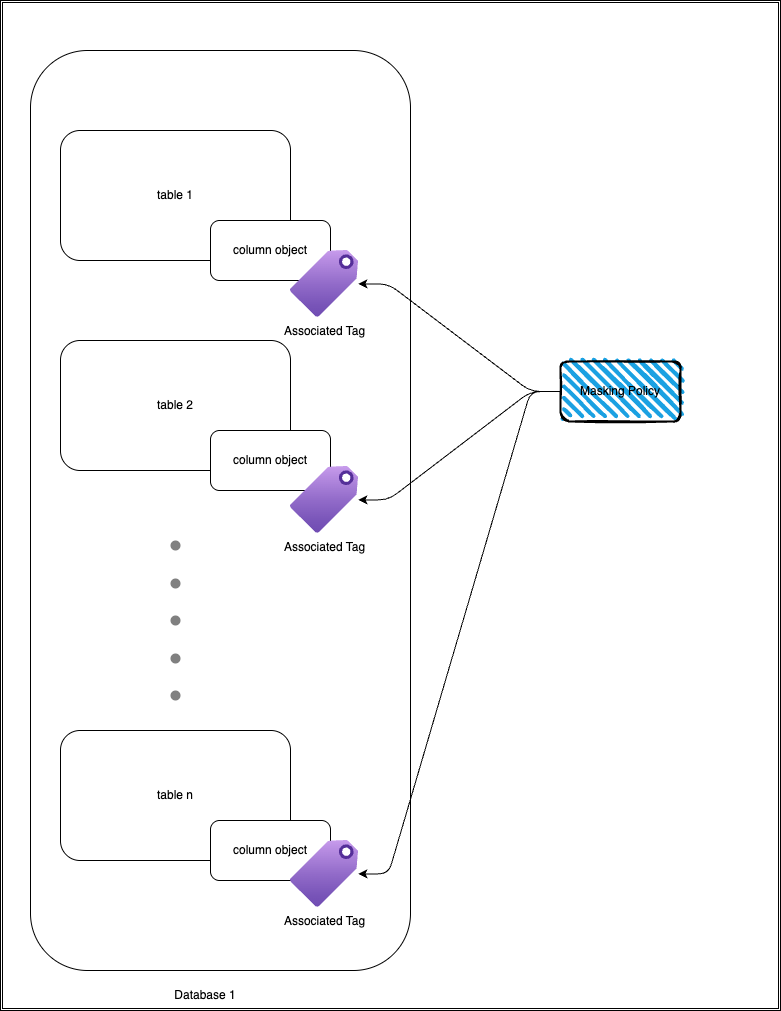
For example lets take this table user_info as an example for a table with sensitive information:
| customer_id | first_name | last_name | phone_number | date_of_birth | |
|---|---|---|---|---|---|
| 1 | Alice | Smith | alice.smith@email.com | 555-123-4567 | 1990-01-15 |
| 2 | Bob | Johnson | bob.j@email.com | 555-987-6543 | 1985-07-22 |
| 3 | Carol | Lee | carol.lee@email.com | 555-555-1212 | 1992-03-10 |
| 4 | David | Kim | david.kim@email.com | 555-321-4321 | 1988-11-05 |
| 5 | Emma | Brown | emma.brown@email.com | 555-654-7890 | 1995-06-18 |
| 6 | Frank | Miller | frank.miller@email.com | 555-246-1357 | 1983-09-30 |
| 7 | Grace | Wilson | grace.wilson@email.com | 555-369-2580 | 1991-04-25 |
| 8 | Henry | Davis | henry.davis@email.com | 555-147-2583 | 1987-12-12 |
| 9 | Ivy | Clark | ivy.clark@email.com | 555-789-6541 | 1993-08-07 |
| 10 | Jack | Lewis | jack.lewis@email.com | 555-852-9630 | 1989-02-19 |
And imagine if we applied a tag ‘data_sensitivity’ to the email column with a string value of confidential, then the masking policy would automatically be applied to any queries that access this column (masking will depend on how the implementation is done).
| customer_id | first_name | last_name | phone_number | date_of_birth | |
|---|---|---|---|---|---|
| 1 | Alice | Smith | **** | 555-123-4567 | 1990-01-15 |
| 2 | Bob | Johnson | **** | 555-987-6543 | 1985-07-22 |
| 3 | Carol | Lee | **** | 555-555-1212 | 1992-03-10 |
| 4 | David | Kim | **** | 555-321-4321 | 1988-11-05 |
| 5 | Emma | Brown | **** | 555-654-7890 | 1995-06-18 |
| 6 | Frank | Miller | **** | 555-246-1357 | 1983-09-30 |
| 7 | Grace | Wilson | **** | 555-369-2580 | 1991-04-25 |
| 8 | Henry | Davis | **** | 555-147-2583 | 1987-12-12 |
| 9 | Ivy | Clark | **** | 555-789-6541 | 1993-08-07 |
| 10 | Jack | Lewis | **** | 555-852-9630 | 1989-02-19 |
ℹ Masking policy strategy, design and implementation is not within the scope of this article.
Pain-points
It is almost given that if data in modelled in snowflake then its implemented via dbt(data build tool). There are two main issues with using tags with dbt:
- You will almost always have to either have a custom macro or rely on external packages to attach tags to objects in snowflake via dbt.
- Tags dont propagate to the downstream models, which mean that the dbt developer now has to check every sensitive column to make sure that the tags have been appropriately applied.
Now with this new auto-propagating feature, not only will the data modelers need to stress about applying all downstream tags in dbt, but they can also add tags are model level to add new level of data sensitivity level. They have the option of making it more secure or public depending how the tag’s on-conflict property has been setup. Both cases will be part of the demo section of the article.
Lets follow on the example table. Before this feature if the user created another view/table based on the reference table user_info, then the user must manually apply the masking policy to the new view/table.
Mock Data Flow
If any of the downstream models use the column email then the user would had to manually apply the
tag to those new column objects.
Auto Tagging Demo
Instead of just showing in two tables, we can demonstrate the auto-tagging feature in action with a simple dbt project. If you are using Snowflake trial account to test out this new feature, the following features are not available in Snowflake Trial account:
- API integration
- Network rules
- External Access integrations
This just means we have to copy and paste the dbt project to snowflake manually, it can be done via
snow cli application but I have done it manually.
dbt project setup
LINK to the starter dbt snowflake project.
- Snowflake trial account
- New workspace
- Download the Repo
- Upload the tasty_bytes_dbt_demo
- Remove all the packages from the yml file
- Run the
tasty_bytes_setup.sqlin snowflake after commenting out:- API integration
- Network rules
- External Access integrations
- 32 queries should run at this point
Now the setup has been completed.
Create the dbt project via UI deploy dbt project - tasty_bytes_dbt_project.
Governance Setup
Firstly lets create a role that will allow access to sensitive data if the user has the role available to them.
create role sensitive_access_role;
Now lets create the tags that is going to be used to mark the column as sensitive column, notices that the tag has three allowed values. This will come into play when the masking policy is going to be created.
CREATE TAG data_sensitivity
  ALLOWED_VALUES 'confidential', 'internal', 'public'
  PROPAGATE = ON_DEPENDENCY
  ON_CONFLICT = ON_DEPENDENCY_AND_DATA_MOVEMENT;
Masking policy now utlises both the CURRENT_AVAILABLE_ROLE function and SYSTEM$GET_TAG_ON_CURRENT_COLUMN function to identify if the user should have access to the sensitive data.
CREATE MASKING POLICY mask_sensitive_var AS (val STRING)
RETURNS STRING ->
    CASE
        WHEN contains(CURRENT_AVAILABLE_ROLES(), 'SENSITIVE_ACCESS_ROLE')
        and SYSTEM$GET_TAG_ON_CURRENT_COLUMN('data_sensitivity') = 'PUBLIC' THEN val
        ELSE '****'
    END;
Last piece of integration is to associate the tag with the masking policy
ALTER TAG data_sensitivity SET MASKING POLICY mask_sensitive_var;
Tag Application
Apply tag at source table
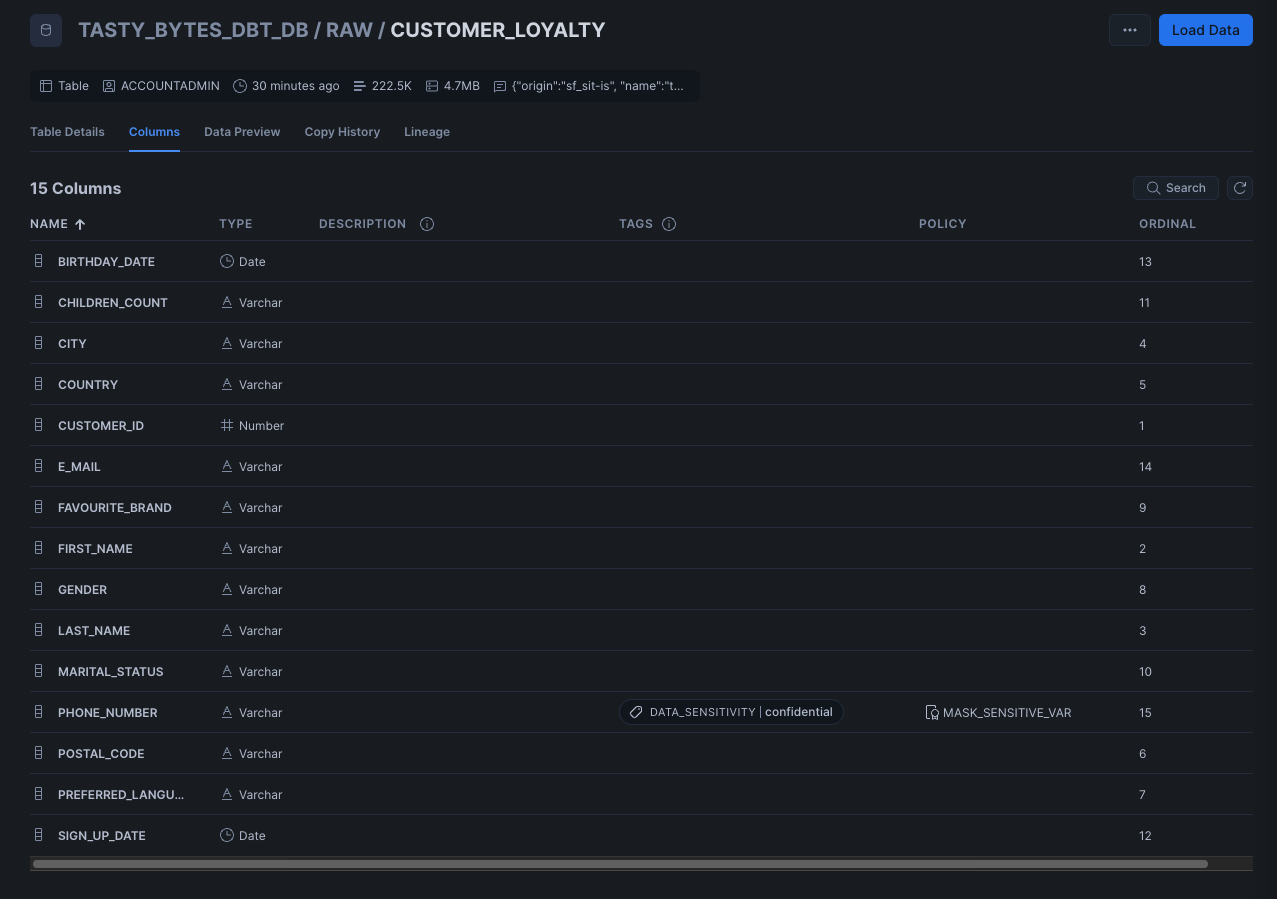
Example I have set the tag DATA_SENSITIVE on the CUTOMER_LOYALITY table on the PHONE_NUMBER column with the value confidential.
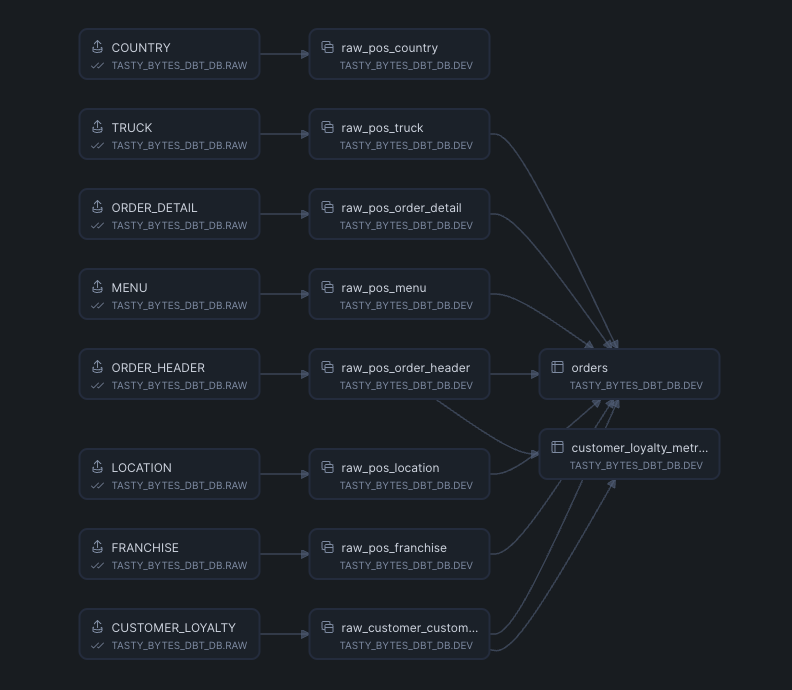
dbt Project DAG
After running the dbt project you can see the linage of the dbt models, one of the downstream models of the table CUTOMER_LOYALITY is the model customer_loyalty_metric.
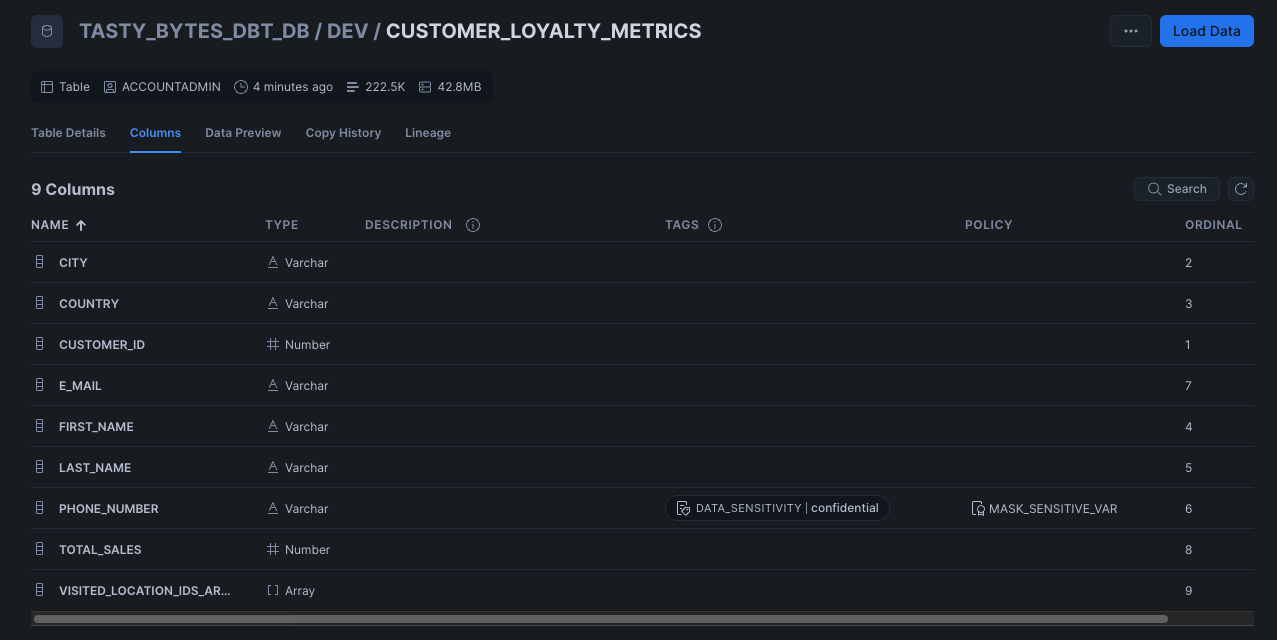
Visual verification
Using Snowflake UI we can see on the column PHONE_NUMBER that the tag DATA_SENSITIVE has been applied with the value confidential along with the policy MASK_SENSITIVE_VAR since the tag is associated with the masking policy and if we did see the data in the table it would all be of the same value *****.
Conclusion
From this simple dbt example we can see that the model developer no longer needs to take the overhead and ownership of the tagging the sensitive column. Snowflake effectively have shifted the responsibility to the left and made the source table and owners of the data be responsible for the data governance.
This does not limit dbt users from adding their own tags in the downstream components. In fact the intermediate models tags will also be propagated to downstream models in the dbt project.
Future Works
- Add examples of how tag conflict resolution will work auto-propagation
- Add examples of multiple tags on a single column