
This article goes over the new python runtime and package dependency management tool uv.
TLDR
Python runtime and package management tool.
Installation uv and python
curl -LsSf https://astral.sh/uv/install.sh | sh
Now that uv is install you can install and manage different versions of python.
uv python install 3.13
You can install multiple versions of python packages and by adding a .python-version file at the root of your
python project directory uv will automatically use that version of python for the project.
This file can be updated to different python version and uv will either use that version of python or will raise an
error and ask the user to install that version of python.
!!! Use images to demonstrate this behaviour.
Usage
uv offers a lot of features that I have not yet used while writing this article, so I’ll focus on my regular
usage of this tool.
- Create the project directory
mkdir python-side-project-2025
cd python-side-project-2025
- Now that you are in the directory, you can initiate the
uvproject.
uv init
This creates three files in your dir.
- README.md
- hello.py
- pyproject.toml
pytproject.toml file is what matters as it defines the python project.
- Start adding packages
uv add pandas
This will create the .venv environment and place all the packages and dependencies of all you packages in this folder.
pyproject.toml file is also updated
[project]
name = "project"
version = "0.1.0"
description = "Add your description here"
readme = "README.md"
requires-python = ">=3.13"
dependencies = [
"pandas>=2.2.3",
]
- Activate the python environment
source .venv/bin/activate
- Add/Remove packages
uv add fastapi
[project]
name = "project"
version = "0.1.0"
description = "Add your description here"
readme = "README.md"
requires-python = ">=3.13"
dependencies = [
"fastapi>=0.115.8",
"pandas>=2.2.3",
]
uv remove fastapi
[project]
name = "project"
version = "0.1.0"
description = "Add your description here"
readme = "README.md"
requires-python = ">=3.13"
dependencies = [
"pandas>=2.2.3",
]
There is no need to sync the environment, these command add/remove packages on the go and stay synced with the python environment.
There is a lot of other features a consumer of this package can use like dev and group dependencies, I like to keep
my workflow simple and these are the basic commands I have used to get things done in my python projects.
My pervious python ecosystem
Python eco-system was always a bit messy from installing the runtime itself to installing packages for different run times.
Conda
My first experince with a real package manager was with conda where I just did conda install.
At that point I didn’t really understand Python virtual environment and was just happy that
all the packages are getting installed in my **main** environment.
Eventually when I started working on different project where I needed different set of packages and had installed newer versions of the existing packages, it is then when I first experience the HELL.
Packages started to conflict, things that used to work stopped working and I had to just start creating and maintain new envs everywhere.
The worst part was that conda didn’t have all the packages for all the the runtime.
So it wasn’t a complete solution.
Poetry and Pyenv
This combination of a python runtime manager and coupled with a more declaritive python package manager,
it came to me like a lifesaver. I knew how to use the pyproject.toml file, things were much more
declaritive and it working.
I could just mention the python version in .python-version and things would run easily.
Shattering of the Rose Glass
Eventually I added a lot of packages 25+ which is somewhat standard in Python Data eco-system,
it starts to get crowded and this is where poetry starts to fail gradually but surely.
Along with it not able to just migrate to a new version of python easily with a lot more struggling
and fighting with the poetry.lock file.
Export to requirement.txt file didn’t work consitently for the environment to be replicated in dockermore on docker here.
Envrionment didn’t work cross platform, Windows poetry project would not resolve dependency to MacOS.
When poetry did resolve all the packages it would take a long time or it could be stuck in a lookup
loop.
This were not ideal and it wasn’t HELL but it wasn’t a ideal solution and still needed a thought before making any change to the environment.
uv
uv was the shining new tool that I heard about, that came as beacon of light to consolidate the
runtime and package management for Python.
Could another standard be the final one?

So what is actually better?
Runtime Installer
To start of with it can install and select the correct python runtime version.
Don’t need another python installation tool to do this for me which is really nice.
In combination with the .python-version file where the version can be declared for eg.
3.12.1, uv will pick the right version when activating the virtual environment.
Virtual Environment Location
Location of the virtual environment or the .venv folder, its right there. No longer do I need to
wonder where the file are which space in being take by my venvs. This make sourcing the venv really
easy.
source .venv/bin/activate
Speed
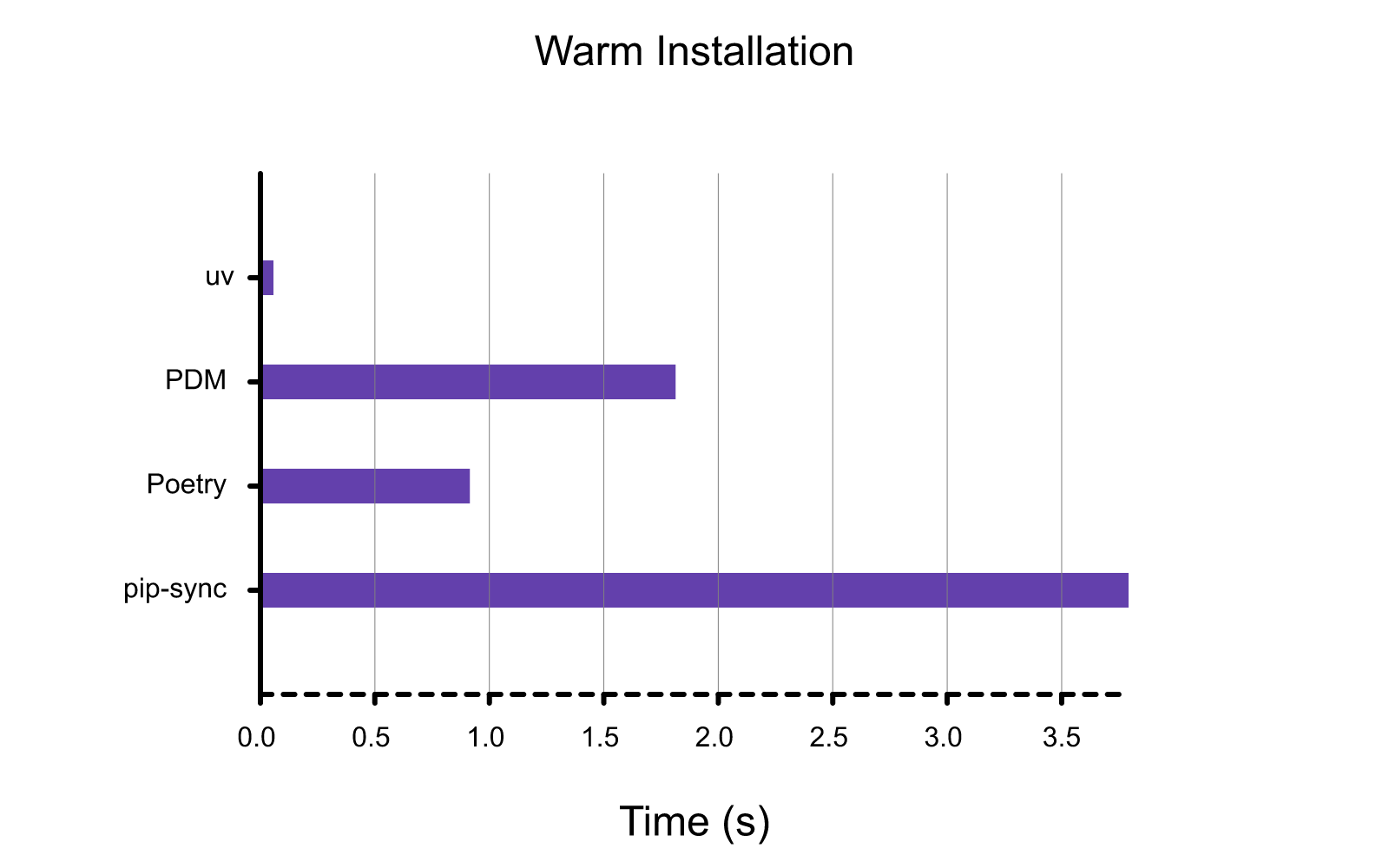
The speed at which uv resolved the dependency tree and then installs the packages is the best that I
have ever seen. Never though it would be this fast.
All the benchmarks are on their Github website
The most interesting one is the warm installation comparison.
Cross Platform
uv.lock unlike other python management tools, this lock file works on cross-platform.